
How I Kickstarted My Home Assistant Smart Home at IKEA for Cheap
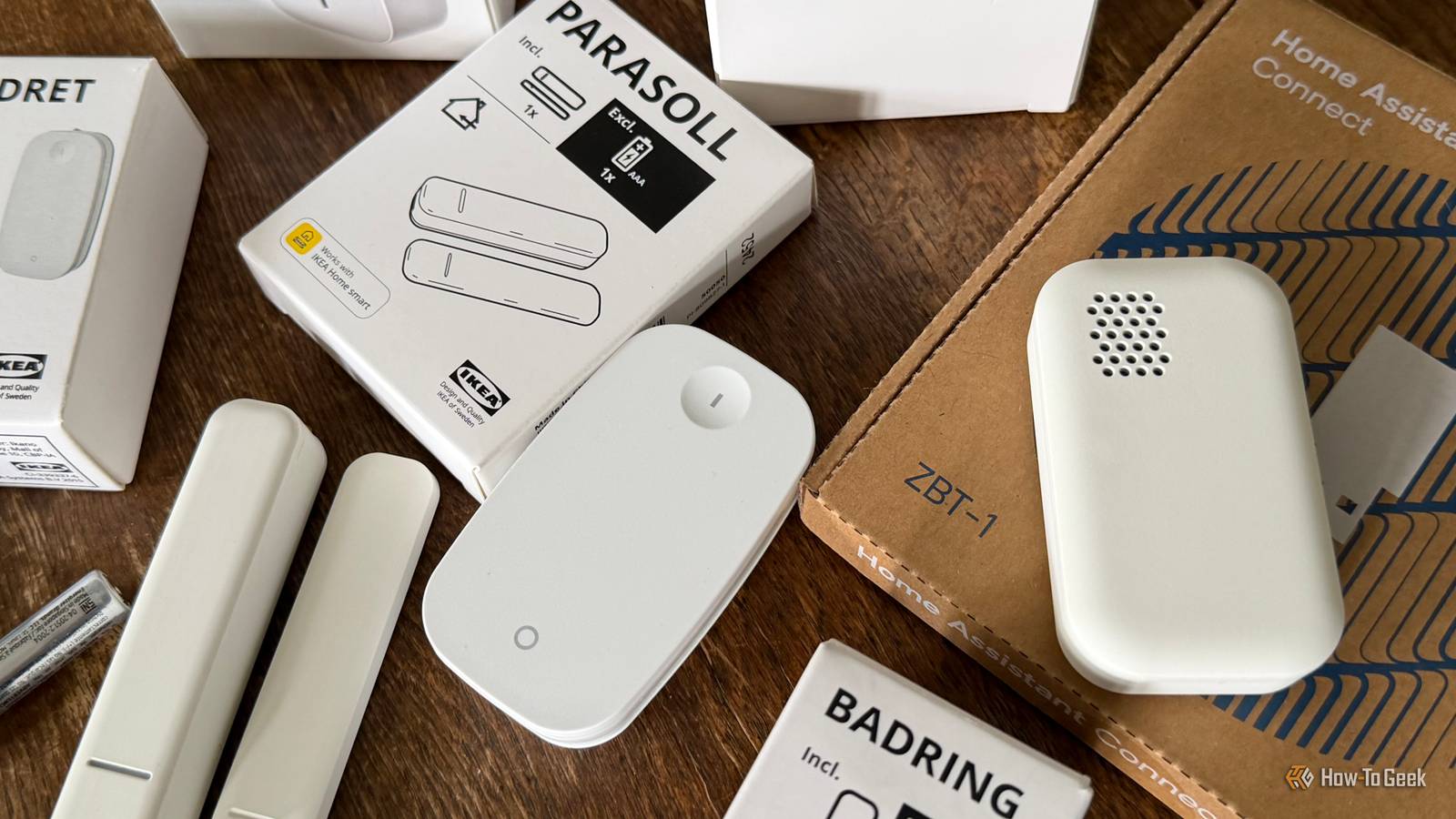
My recycling bin is overflowing with packaging for smart plugs, remotes, and sensors. After starting my smart home journey relatively slowly, I decided it was time to kick things up a notch and part with a few hundred dollars at everyone’s favorite Swedish flat pack and hot dog retailer.
My only regret is that I didn’t do it sooner.
Why IKEA Smart Home Products Rule
IKEA’s range of smart home products might be the most mainstream examples of their kind. You don’t have to be a super-nerd to be exposed to them; you’ve probably walked past them with a trolley full of cork coasters and affordable cookware multiple times. IKEA sells everything you need to get started, from switches and controllers to the hub required to actually use them.

If you pick up any of the company’s smart home devices, you’ll also spot the “Zigbee” logo on the box. Zigbee is a low-powered wireless mesh networking system, a bit like Wi-Fi. By using a master controller, known as a coordinator, you can control devices wirelessly without having to rely on congested and unreliable Wi-Fi networks.
IKEA’s entire smart home lineup currently uses this relatively accessible standard (the company has also pledged support for Matter going forward). All you need to take advantage of it is a relatively cheap coordinator like the Home Assistant Connect ZBT-1. While you can use IKEA’s own hub, getting it integrated into Home Assistant is a pain, support is limited to IKEA products, and it’s more expensive than something like the ZBT-1.
- Dimensions (exterior)
-
38.5 x 18 x 4,5mm
- Weight
-
4g
Add Zigbee or Thread compatibility to your Home Assistant server using the ZBT-1, previously known as the SkyConnect. While multi-protocol support has been tested, the dongle has proven to be most reliable when running one or the other (so you can always buy two to add both).
Fortunately, the rest of IKEA’s smart home lineup is cheap compared to even Amazon’s offerings. For example, the IKEA Tretakt smart plug costs $10 and supports simple on and off states. Amazon’s own brand plug is listed at $25 (though it’s consistently discounted) and lacks native offline support within Home Assistant.
This logic seems to apply to IKEA’s entire smart home lineup, both in the U.S. and abroad. I’m in Australia, and I definitely can’t find anything cheaper (plus I can drive there, which is nice).
What I Ended Up Buying
I’ve already mentioned the Tretakt smart plug, which is arguably one of the best places to start. My partner and I have a lot of regular non-smart lamps in our house; we even ditched our overhead lights in favor of big fans. Being able to automate pretty much every light in the house is a game-changer. I spent $100 alone on these, while splashing out on two slightly more expensive Inspelning smart plugs with energy monitoring ($13).

I didn’t buy these plugs so that I could monitor energy usage, but so that I could use the total energy consumption as a trigger. This lets me do things like get an alert when the washing machine is finished because the power consumption has dropped below a certain level, and get an alert if the fridge suddenly stops working.
On top of this, I also bought three Badring water leak sensors ($13). For the money, this seems like a no-brainer since my insurance excess is considerably more expensive. I’m already looking at some sort of powered shut-off valve so that I can create an automation that turns off the water supply in case of a leak, but for now, I’m going to have to be content with a mobile notification (and maybe some flashing lights).
My last few purchases were to satisfy curiosity more than anything. I picked up a Vindstyrka air quality sensor ($60). This is perhaps my most frivolous purchase since it’s a passive sensor that monitors indoor air quality (PM2.5), temperature, humidity, and indicates whether volatile organic compounds (VOCs) are rising or falling on the display. It also plugs into Home Assistant, which logs everything and even exposes the VOC index within the dashboard. It looks good in the corner of the room and satisfies my weather nerd tendencies; Zigbee support is just an added bonus.

I’ve also got a few sets of IKEA’s Parasoll window and door sensors ($15). The plan is to put one on the rear and front doors (which are security screens) and another on the garage. I wasn’t sure that these would fit where I wanted them to go, so I stopped at three rather than putting them on every door and window (which would probably be a waste anyway). It turns out the tolerance zone for gauging and open and shut state is generous.

The last thing I picked up, right as I was telling myself “enough is enough” was a cheap Rodret dimmer remote ($10). My long-term goals are to get a couple of these and use them to idiot-proof the house for visitors. It’s a work in progress, right now it turns on the lights in our spare room so that visitors don’t start breaking automations by turning switches on and off.
How It All Works
Adding these devices to Home Assistant and getting them to work is incredibly easy. The first thing I had to do was add my Zigbee controller. I’m using a Mac mini as my Home Assistant server, so after connecting the ZBT-1 to the USB port on the back using the supplied extension cable, I shut down my server and tweaked the VM settings to recognize the USB controller.
I then restarted the server like normal, and granted the VM access to USB devices as per macOS’ security policy. From here, everything was pretty much automatic. The ZBT-1 appeared in the dashboard, asking me if I wanted to “Add” it to my setup. I followed the instructions, picked Zigbee instead of Matter when asked, then found myself back on the dashboard again.

This time I was asked whether I wanted to install the Zigbee Home Automation (ZHA) integration. Once again, I clicked through some simple setup questions and everything was complete. I accessed the ZHA integration under the Settings > Devices & services menu, then clicked “Add Device.”

From here, the whole process was absurdly simple. Connect plugs to the wall and switch them on, press and hold the small pairing button on the top until the LED flashes, then watch as Home Assistant recognizes and has a brief conversation with the device. From here, give it a name so that you know what it does, and move on to the next one. Rinse and repeat until you’ve got everything set up the way you like it.
A few devices used a slightly different pairing method—notably tapping the pairing button four times—but they were similarly easy. Everything worked immediately from the dashboard, at which point I was free to start building scenes, automations, and custom dashboards that laid out every device.
Though Home Assistant is a powerful platform, I also added HomeKit support using the HomeBridge integration. You can add this under Settings > Devices & services > Add Integration by clicking Apple > HomeBridge. This exposes all of your connected devices within Apple Home, even though they aren’t HomeKit compatible.

For me, this is a game-changer. HomeKit-compliant devices are typically far more expensive. Though Apple is moving ahead with support for open standards like Matter via Thread, turning cheap IKEA devices into HomeKit-ready smart home gadgets can save you hundreds or thousands of dollars right now. Since the Zigbee standard is so well established, you have the lion’s share of devices to choose from, too.
Buy More IKEA Smart Plugs Than You Need
While Zigbee offers a maximum theoretical range of almost 1000ft (300m) within a wide-open space, this can be reduced significantly indoors, where walls, people, and other objects get in the way. You’ll be lucky to get around 250ft (75m) of range from a controller, and this can drop to as low as 30ft (10m).
For Wi-Fi-powered smart home devices, this would be a problem. But the vast majority of mains-powered Zigbee devices work as Zigbee routers. This makes IKEA’s $10 smart plugs one of the most cost-effective ways of bridging the gap between devices on your Zigbee network.

As long as you pair the smart plug with your Home Assistant server, it will be used as a relay. You don’t need to actually use the plug at all to get the benefit (though you might as well if you can add a lamp, fan, or other simple on-off device that would benefit).
I was concerned that my leak monitor in the laundry at the back of my house wouldn’t make it through two layers of brick and whatever else is in the way, but with the addition of a plug in the kitchen, things work perfectly.
I knew I wanted a smart home, but I put off building a proper one for way too long. While some of this came down to waiting for Matter (and Thread) to mature and become widely available, much of it was tied to price. Even though Matter is an exciting step forward for smart home interoperability, it’s still pretty expensive.
That’s exactly where IKEA’s range excels. The Swedish retailer has been producing Zigbee-powered smart home devices since 2012, and the Zigbee standard itself dates back to the mid-2000s. I never thought I’d end up “settling” for Zigbee when Thread is the hot new thing, but I wish I’d done it sooner.
link

:max_bytes(150000):strip_icc()/GettyImages-1220602415-869d569919b24829b21868f530a8207f.jpg "The 1980s Trend Designers Hope Never Comes Back")